Plugin Cleaner
A downloadable tool for Windows
Your project is running plugins nobody on your team ever chose. On Unreal Engine 5.8, 173 engine plugins are enabled by default. They appear nowhere in your .uproject, so no diff ever showed them to a reviewer — and every one of them is loading in your editor right now. The first time anyone asks which ones matter is usually a Fab submission checklist, a build-size question, or an editor plugin turning up inside a packaged build.
The manual answer is grim, and the UE forums record it: turn plugins off one at a time and see what breaks. A real user doing exactly that disabled critical engine plugins and broke the project. That failure is the reason this tool exists — and the reason it is built the way it is.
It never says "unused". That word is a lie no static tool can back.
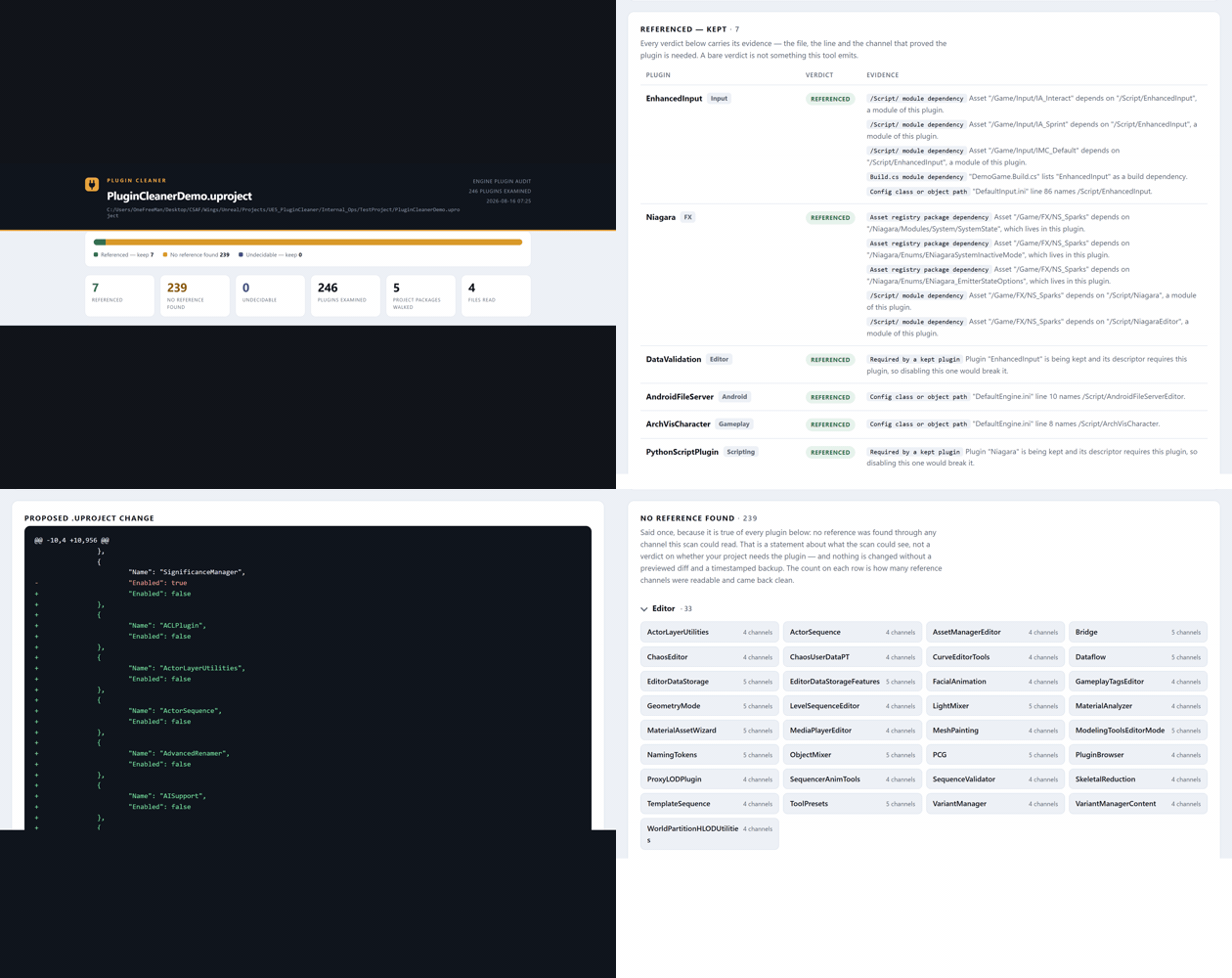
Plugin Cleaner reads six evidence channels and puts every enabled engine plugin in one of three buckets, not two:
- REFERENCED — a reference was found. The row shows the referencing asset, file and line. You are never asked to trust a bare verdict.
- NO REFERENCE FOUND — every channel this tool can read came back clean. That is a statement about what the scan could see, not a claim about your project. This is the only bucket the disable action will ever act on, and only after you have seen the diff.
- UNDECIDABLE — no honest verdict is available: the plugin exposes no readable reference channel, or your project performs string-constructed loads no static analysis can follow. Always kept. Never acted on.
Everything the scan cannot read pushes a plugin toward KEEP, and every unreadable channel is printed in the report rather than silently dropped. A refused scan is a refused report — a report missing one channel is not a weaker report, it is a wrong one.
The six channels
- Asset registry package dependencies — a package outside the plugin's mount depending on one inside it. Registry tags only; the scan never loads an asset.
- /Script/ module dependencies — a Blueprint using a C++ class from a code-only plugin. The most common real reference, and one a content-only scan structurally cannot see.
- Your Build.cs files — project modules naming plugin modules in their dependency lists.
- Config class paths — a
Config/*.ininaming/Script/Module.Class. This is how a renderer or input setting silently binds a plugin with no asset and no code reference anywhere. - Plugin-to-plugin dependencies, resolved to a fixpoint — disabling a leaf that a kept plugin requires is the failure that actually breaks projects. Non-optional.
- String-constructed dynamic loads —
StaticLoadObject,LoadClassand friends are detected and reported as call sites, unattributed. The tool tells you they exist; it never guesses which plugin one of them might reach.
The fix is a diff, not a mystery.
The disable action writes "Enabled": false entries into your .uproject as a surgical text edit. No JSON reformat, no reordered keys, no respaced lines — every byte the tool did not deliberately change is byte-identical, so a change is a small reviewable diff in source control that your whole team inherits.
The proposed diff is embedded in the HTML report on every run, with or without -Apply. Before touching disk it re-reads the file to prove nothing changed under it, takes a timestamped backup, writes, then reads the result back and verifies it says exactly what the plan said. There is no path through the writer that modifies your project without a recoverable copy already on disk. One call reverts.
It is a commandlet. There is no in-editor panel — please read this before you buy.
Plugin Cleaner has no toolbar button, no menu item and no editor window. You run it as a commandlet, at your desk or on a build machine, and it writes JSON and HTML reports with distinct exit codes for "clean", "findings present" (opt-in), "scan refused" and "apply failed". The HTML report prints the work counts next to the verdicts — a scan that examined nothing reports itself as suspect, never as clean.
That is deliberate. The whole analysis and remediation path runs with no editor UI loaded, so what your CI executes is the same code path you ran by hand. If you want a click-to-clean button inside the editor, this is honestly not that tool; if you want a scriptable commandlet with real exit codes, it is built for you.
What Epic ships, and where this fits.
Epic ships two beta tools in this space, both off by default: PluginReferenceViewer (a plugin-to-plugin dependency graph) and PluginAudit (gameplay-tag dependency violations across game-feature plugins). Both are reporters over their own specific questions, and both are worth turning on. Neither answers this tool's question — which of my enabled engine plugins does nothing in my project reference — and neither writes the fix into your .uproject. Plugin Cleaner is the improved, act-on-it layer beside them, not a replacement for them.
Measured, not claimed
- Compiles with zero errors and zero warnings under
RunUAT BuildPluginon UE 5.8 (10 real compile actions in the gate log — the gate refuses to report clean without them). - 17/17 automation tests green in-engine on UE 5.8.
- Demo project scan: 246 plugins examined — 7 referenced (with evidence), 239 no reference found, 0 undecidable.
Supported: Unreal Engine 5.8 (Win64, verified by a real build and a real in-engine test run — the only version claimed, because it is the only one that was run). Mac/Linux are source-compatible but not verified.
What ships: raw, readable C++ source (no binaries), full Doxygen on the public API, a user guide, and the fixture-project workflow documented. Editor-only module — nothing enters your packaged builds.
Built by CSAF — Corey and Stephanie's Asset Factory. AI-assisted code and store graphics, truthfully disclosed. See also: Asset Sentinel, Config Warden, Migration Ledger, Duplicate Mesh Consolidator.
Purchase
In order to download this tool you must purchase it at or above the minimum price of $19.99 USD. You will get access to the following files:
Development log